Install CTI Data Connector SoftPhone application
To install the CTI Data Connector SoftPhone application (AppExchange-package), you need salesforce admistrator rights. By installing and using the CTI Data Connector SoftPhone application you agree to the Master Subscription Agreement
Release Version (7.4017.13)
Update Installation
If you upgrade from any version before 6.4 use the update process.
New Installation
•Click on the link to start the installation (Professional, Enterprise, Unlimited or Developer Edition ).
•If you are installing into a sandbox organization you must replace the initial portion of the URL with http://test.salesforce.com - click on the link to start the installation in a sandbox
Note:
If you are using mydomain you have to replace https://login.salesforce.com/ with your login page
Example: https://yourcompany.cs80.my.salesforce.com/packaging/installPackage.apexp?p0=04t2G000000kbc8
•Login with your salesforce admin credentials
•Select: Install for Admins Only. Permission Sets are used to grant access.

Update note
If you install an update/new version you have to
•run the Updates procedure
•ensure that the following components are also updated to the latest version
If you are unsure, which CTI Data Connector SoftPhone or CTI Data Connector - TAPI Link / CTI Data Connector - Skype for Business Link you have installed, just hover over the headline: CTI Data Connector in the CTI Data Connector SoftPhone application. The version number is displayed.
SoftPhone version
The first entry with SoftPhone is the CTI Data Connector SoftPhone application version number. Latest version is 7.4017.13.
Connector or Server version
The second entry is the connector or Server version
•TLC (CTI Data Connector - TAPI Link). The latest version is 5.7.2. For CTI Data Connector - Skype for Business Link the latest version number is 5.7.0).
•TLC x.x (uaCSTA) is displayed when an Desk Phone with Mirage uaCSTA Cloud Connect is used. This is for informational purpose only

The CTI Data Connector SoftPhone application is updated regularly. We recommend checking for updates once per month.
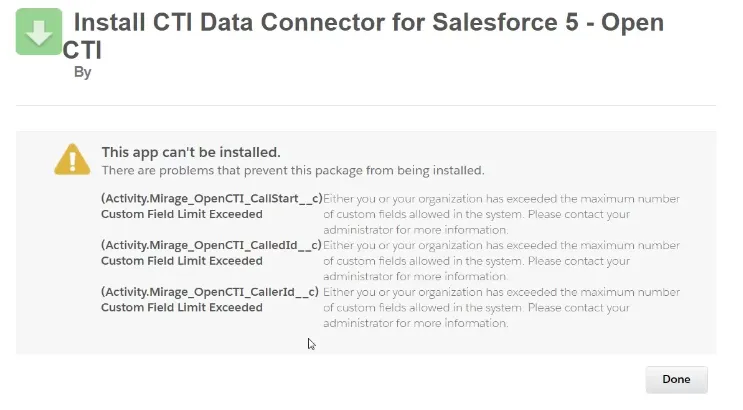
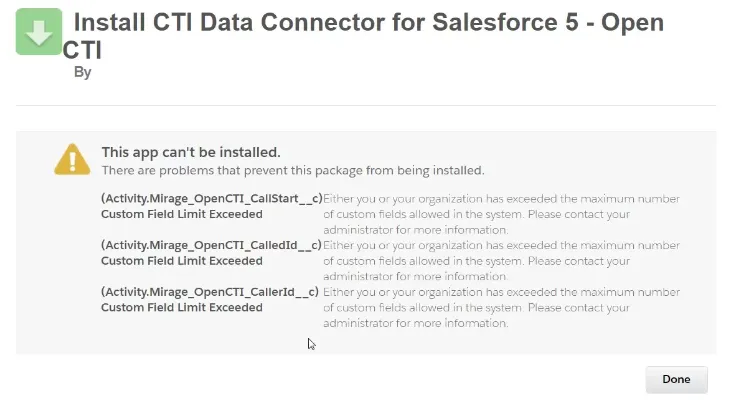
In case you get the error message: Custom field limit exceeded you have reached the maximum number for custom fields for activities (20 in the Salesforce Professional Edition / 100 in other Edition). CTI Data Connector for Salesforce® adds 5 new fields. Delete unused custom fields (Setup/Customize/Activities/Activity Custom Fields).
In case you get the error message: Too many callouts: 101 erhalten, do a Browser Refresh. The script is restarting