CTI Data Connector SoftPhone
Incoming and outgoing calls are signaled in the CTI Data Connector SoftPhone on the left side of the screen. As it is a pure Browser based application you have to consider a few things:
•The application only works when logged into Salesforce
•At least one TAB with the CTI Data Connector SoftPhone must be opened. The CTI Data Connector SoftPhone will then still answer to calls when you are navigating on other web pages or working in other applications. Internet Explorer requires to switch to that TAB while a call is active
•Switching between TABs or between different Browser sessions while a call is active and synchronizing the call information like the call note is not supported in all Browsers
•Limited support of old Agent Console
•The CTI Data Connector SoftPhone is available in a lot of languages. The language, which is configured for the Salesforce user, is used for the CTI Data Connector SoftPhone
CTI Data Connector SoftPhone
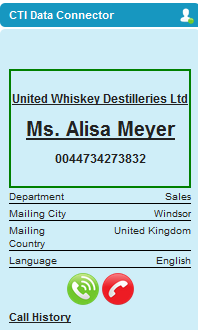
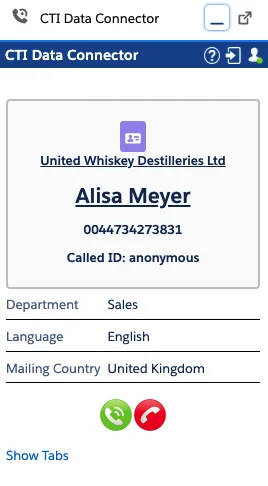
Depending on the call state, buttons are enabled or disabled e.g. to hold or end a call.
The title bar includes an icon for help and connection status



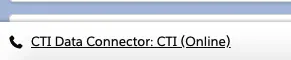
ILightning has an extended title bar with information about the call status


Salesforce Classic
Salesforce Lightning
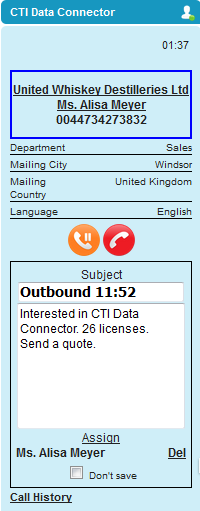
You can can type in a phone note (comment) which is automatically saved in the activity history including the call type (incoming / outgoing call) and call duration.
Call Result (Wrap-Up)
After the call is terminated, you can benchmark the call by selecting a call result. It is saved with the phone note as an activity and is available for reporting .
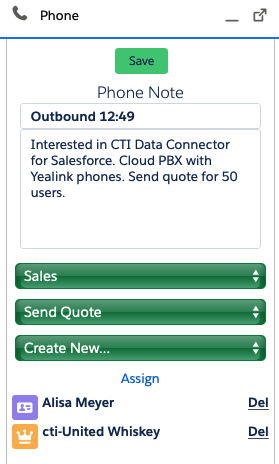
Find out more about the Call Result (Call Wrap-Up) feature and how to configure it.
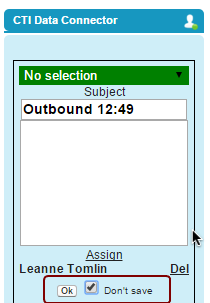
Do not save a call
If configured, a button is available to not save a call as an activity. This is handy for personal calls. Select the option: Don´t save call
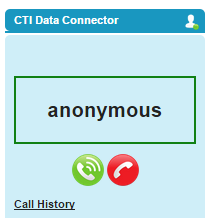
Anonymous Call
If caller ID is suppressed, the call is signaled as Anonymous. Just navigate to a record like Account or Contact. Depending on the setup, the call is either automatically assigned to this record or you have to click on the Assign button.
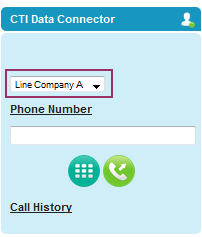
Select outgoing phone line
If configured, a picklist allows changing phone lines to display different phone numbers for outgoing calls.
Additional options
•Call History
Available languages
The CTI Data Connector SoftPhone is available in the multiple languages.
The CTI Data Connector SoftPhone uses the language the user selected in Salesforce. If a language in Salesforce is selected, which is not available in the CTI Data Connector SoftPhone, English is used.
For more information about the Salesforce Open CTI search in the Salesforce online help using the search term: Open CTI overview