Dashboard & Reporting
As Unaric Voice for Teams stores call data as Salesforce Task records, this data can be used for building reports and custom dashboards. Built-in dashboards can help monitor agent performance, track call volumes, and identify trends in customer communication.
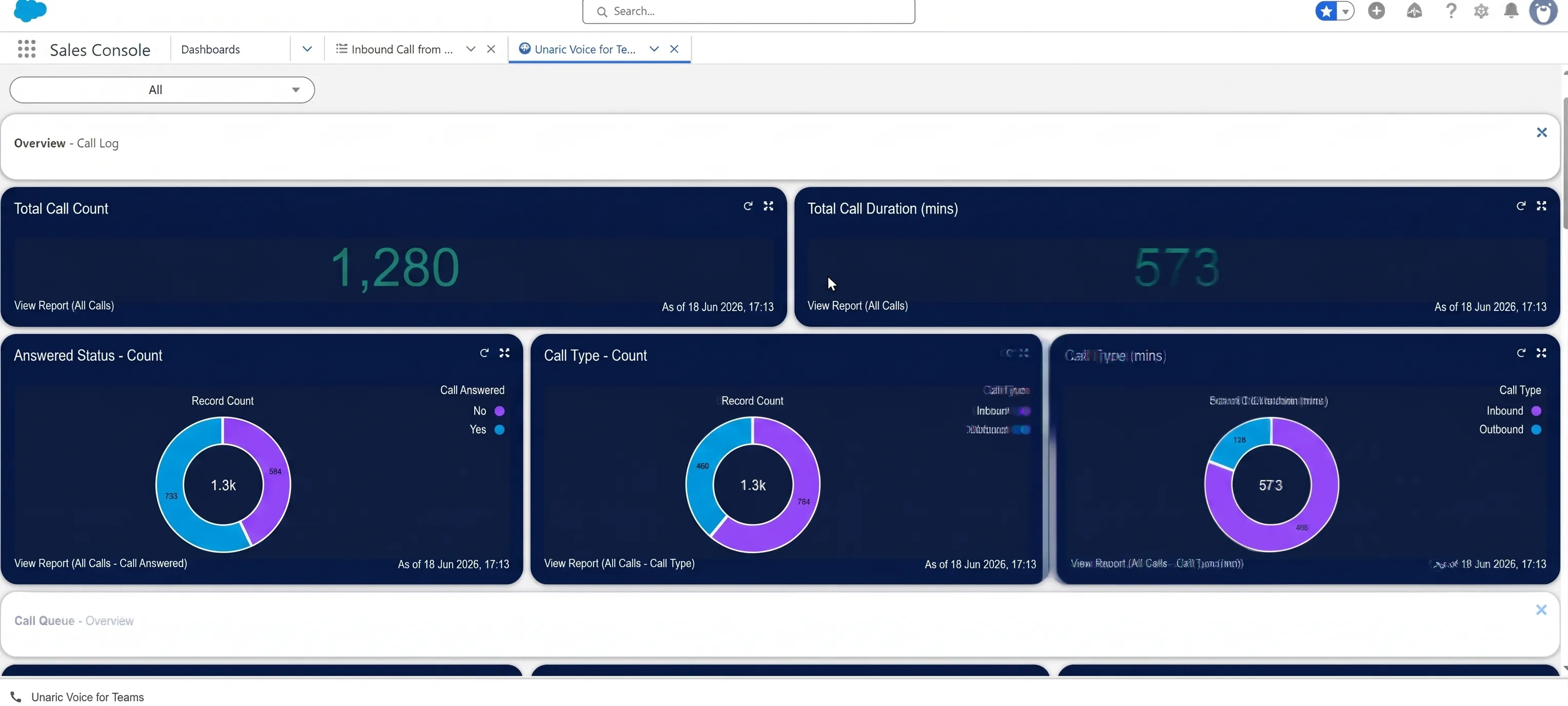
Dashboards are provided as an unmanaged package. After installing it, you can customize or extend them to your preference using standard Salesforce reporting tools.
How it works
Unaric Voice for Teams includes example dashboards that display call activity metrics in Salesforce. These dashboards provide a quick overview of call performance and operational trends.
Available dashboards include:
- Total number of calls
- Call duration totals
- Answered vs. unanswered calls
- Call activity by queue
- Call activity by agent
Clicking on a dashboard will take you to the report they are built from. There, you can find the individual records from which the dashboard pulls its data.
Key metrics
Several key metrics are commonly used to measure call performance.
Metric | Description |
|---|---|
Total Calls | The total number of calls handled within a specific time period, including inbound and outbound calls. |
Answered Calls | The number of calls successfully handled by agents. |
Missed Calls | Calls that were not answered by any agent. |
Call Duration | The amount of time an agent spends actively speaking with the caller. |
Total Call Duration | The full duration of the call, including ringing time before it is answered. |
Average Call Duration | The average time agents spend on calls. |
Calls per Queue | The number of calls received and handled by each call queue. |
Agent Call Volume | The number of calls handled by each agent. |