Work with Salesforce During Calls
When a call is received or placed, Unaric Voice for Teams can automatically identify the caller, open relevant records, and store call details for reporting and tracking.
Phone tasks records
After a call ends, the interaction is stored as a Task record in Salesforce. These records include several fields that store information about the call. The most prominent include:
- Subject: Contains the call type and number.
- Due Date
- Priority
- Call Duration: The call time since it was answered.
- Total Call Duration: The call time since it was initiated.
- Start Time and End Time
- Hold duration
- Dialled number or caller number
- Call Queue (if applicable)
- Call Result and Call Result Group: Automated actions taken once the call ends. These are set during the call, see Call actions.
- Comments: Notes taken during the call.
- Related To: Records related to the task.
Call notes
You can add notes during or after a call to document the interaction. The notes are stored within the Task record in the Comments field.
Once a call starts, the call notes field will appear in the Unaric Voice for Teams call panel.
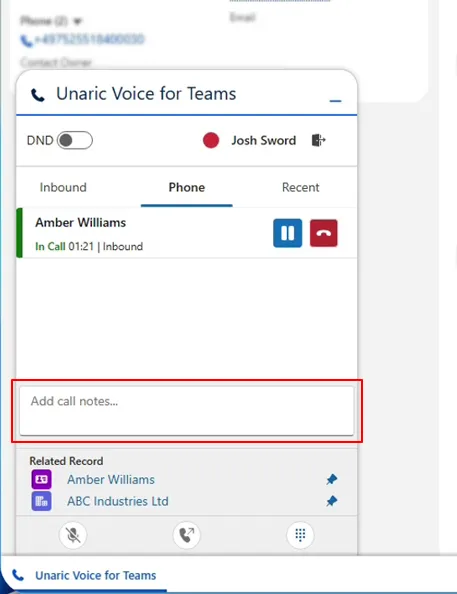
Use this field to write down your notes from the conversation.
Once the call ends, calls are automatically saved in the call's phone task record.
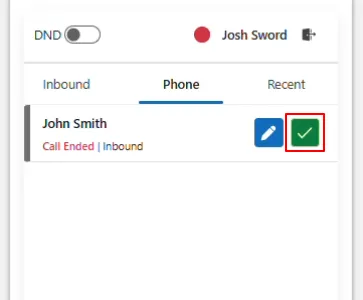
Moreover, you can still add notes to ended calls and click the Done button to confirm notes. This will update the phone task record.
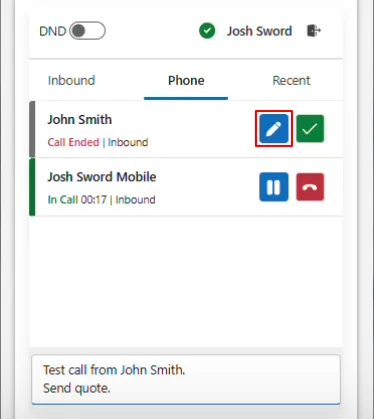
In case you are dealing with multiple calls, use the Edit button to modify notes from previous calls and the Done button to save them.
Salesforce records interaction behaviour
Depending on your org configuration, Unaric Voice for Teams can adopt different behaviours during incoming or outgoing calls, such as automatically open records, create new ones, or prompt agents to select the correct record.
Behaviour | Description |
|---|---|
Automatically opening contacts | When a matching phone number is detected, Salesforce automatically opens the associated contact record from which the agent can view the caller’s details. This information includes:
|
Automatically opening cases | Salesforce can automatically open the most recent or most relevant case associated with the caller. |
Creating records from unknown numbers | If the incoming phone number does not match an existing record, Salesforce can automatically create a new record. |
Handling multiple matching records | If a phone number matches multiple Salesforce records, Salesforce displays a search page for the agent to select the correct record. |