Call Center Configuration
Modifiable subject lines
This feature is available in Call Center v1.6 onwards.
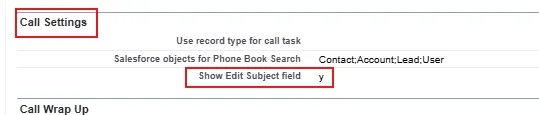
You can modify the subject lines of calls directly from the Voice for Teams client inside Salesforce. This feature is disabled by default and can be enabled via the Call Center:
- In Salesforce, navigate to Setup > [...] > Call Center > Call Centers.
- Find your Unaric Voice for Teams Call Center and click Edit.
- Under Call Settings, check Show Edit Subject field.
- Click Save to finish.