Call Logging
The Unaric Voice MS-Teams Add-In can log calls as Salesforce Tasks. The availability of this feature depends on your configuration and login status on Salesforce and the app.
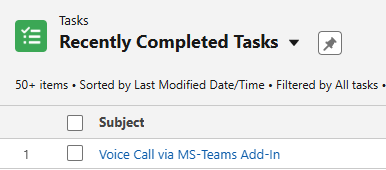
If you have not licensed the Salesforce softphone, you are considered to be using the Unaric Voice Add-In standalone for call functionality. As such, the Unaric Voice Add-In will always handle call logging, even if you are logged into your main Salesforce session.
How it works
In the Microsoft Teams add-in, the Do not log the call in Salesforce checkbox works as a per-call control:
- Unchecked → Logging is active. When the call ends, Salesforce creates a Task with the call details.
- Checked → Logging is skipped. No Task is created.

The decision only applies to the current call; after the call ends, the checkbox resets to its default. As such, it’s a per-call override for the automatic logging behaviour that does not change your global logging settings.
This checkbox only shows up when:
- The Show Option: Do not Save setting is enabled in the Add-In’s configuration in Salesforce.
- You are logged out of the CTI Data Connector (Presence State: Logout) or logged out of Salesforce.
And it’s visible during these call stages:
- Ringing
- Answer (active conversation)
- Dialback
- Hold
Consequently, if you’re fully logged into both Salesforce and the Teams Add-In, you won’t see this checkbox unless you log out mid-session.
Call logging behaviour by login status
Salesforce | MS Teams Add-In | Who logs the call? |
|---|---|---|
Logged out | Logged out | ACD service logs the call if Salesforce config allows saving lost calls or inbound calls while logged out. |
Logged in | Logged out | Salesforce softphone logs the call. Calls may not be logged if the Salesforce tab is idle. The agent should keep the tab active. |
Logged in | Logged in | Salesforce softphone logs the call automatically. The Do not log the Call in Salesforce checkbox is hidden unless you log out of Salesforce mid-session, but the system will still save the call if an ACD task URL is available. |
Logged out | Logged in | Teams Add-In logs the call. Salesforce config settings for lost calls do not apply. |
A user is considered logged out of Salesforce if:
- They log out of their Salesforce org (requires Presence State User Logout Check to be enabled so Teams Add-In takes over logging).
- They select Logout presence state in the Salesforce softphone.
If you briefly open Teams Add-In, the system marks you as logged in to it. If you receive a call while the Add-In is in the background, you must switch to the Add-In to change the checkbox state. Changes are sent immediately to the ACD API to log or skip logging the call. If the Add-In is never opened, the system treats you as logged out and no calls will be logged from the Add-In.