Troubleshooting
In this page you will find common issues and how to solve them. For support, email us at [email protected] .
App issues
If it is a domain-wide installation done by your G-suite admin, only the admin can uninstall it.
If the Admin is the one who installed the app, you may have to reach out to him to turn it off for you.
Occasionally, the connection to your data source can be lost and details do not appear in Unaric Sidebar or errors are displayed. When this occurs, please try the following:
- Refresh the connector by clicking on the Refresh button ( icon) at the bottom of the connector window.
- If refreshing does not resolve the issue, logout of the connector by clicking the Logout button ( icon). You will then need to log back into your data source using the onscreen instructions to re-establish a link to your data source.
If Unaric Sidebar service is temporarily unavailable, the app won't load until it's back. Automatic Sync then resumes from where it left off, so no emails or events are missed.
Billing issues
In case you encounter aTechnical error occurred, request cannot be completed message while purchasing Unaric Sidebar from the licensing page, try the following.
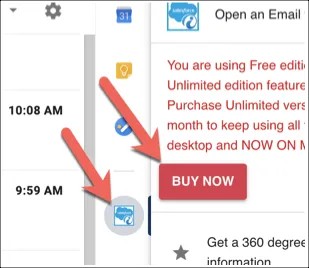
- Open Unaric Sidebar by clicking on the connector icon.
- Click the Buy Now button.
- When the billing page popup appears right click and select Reload.
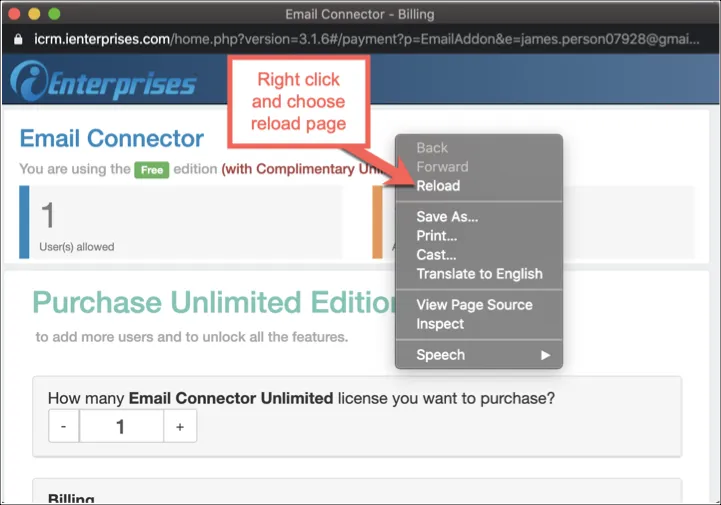
- Completely fill-up the required fields, enter credit card details and click the Purchase Unlimited button.
For inquiries regarding billing, refunds, or cancellations, contact our accounting team at [email protected].
CRM integration issues
This error occurs when your HubSpot user profile does not have permission to install applications from the HubSpot App Marketplace.
Unaric Sidebar is a third-party application. HubSpot restricts the installation of third-party apps based on user permissions. If your profile does not allow app installations, HubSpot blocks the connector before it can be enabled.
This restriction is controlled entirely within your HubSpot instance and is not managed by Unaric.
To solve this error, a HubSpot administrator must update your permissions. Ask your HubSpot administrator to:
- Open HubSpot Settings.
- Go to Users & Teams.
- Select your user account.
- Enable permission to install apps from the App Marketplace (third-party apps).
Once the permission is granted, you can return to the connector setup and complete the installation.
If you continue to see the error after your permissions are updated:
- Ask your HubSpot administrator to confirm the changes were saved.
- Log out of HubSpot and sign in again.
- Retry the connector installation.
If the problem stillremains, contact Unaric Sidebar support at [email protected] and include:
- A screenshot of the error message.
- Confirmation that App Marketplace permissions are enabled for your user.
You may see one of the following messages during Zoho CRM authentication:
- invalid_code
- permission denied – permissions: Crm_Implied_Api_Access
This error indicates that your Zoho CRM login was successful, but your Zoho environment does not have REST API access enabled for your user or organization.
The Unaric CRM connector relies on Zoho REST APIs to:
- Read CRM modules and fields
- Upload and sync data
- Perform authentication-related requests
If REST API access is disabled or restricted, Zoho blocks the connection and returns this error. This configuration is controlled entirely within Zoho CRM and cannot be changed from Unaric.
You may encounter this error when you:
- Connect Zoho CRM to Unaric Sidebar
- Authenticate successfully but fail during authorization
- Switch Zoho data centers (for example, .com, .eu, .com.au)
- Attempt to reconnect an existing Zoho integration
To fix this issue:
Confirm the correct Zoho data center
- Log in to Zoho CRM in your browser.
- Check the domain in the address bar after https://www.zoho. Examples:
- .com
- .eu
- .com.au
- .com.ca
- In Unaric Sidebar, select a data center that matches your Zoho CRM domain.
- Retry the connection.
If this hasn't solve the issue, continue with the steps below.
Enable REST API access in Zoho CRM
Ask your Zoho administrator to enable REST API access to your Zoho CRM user profile. For more information, see Managing Profile Permissions .
If you still see this error after confirming the data center and enabling REST APIs:
- Ask your Zoho administrator to verify that permissions apply to your specific user.
- Log out of Zoho CRM and sign in again.
- Retry the connector setup.
If the issue still continues, contact Unaric Support at [email protected] and include:
- The exact error message displayed.
- Your Zoho data center domain.
- Confirmation that REST API access is enabled.
- Screenshots of the connector setup flow.
This error message indicates a DNS resolution issue on your device or network. In other words, the connector itself is operational, but the network environment cannot reach the required Google services.
Unaric Sidebar add-ons are hosted by Google, not by individual vendors. When this error appears, your computer or network is unable to resolve the Google service domain used by the add-on into an IP address.
You may encounter this error when you:
- Click the connector icon and it remains disabled or greyed out
- Use the connector on a restricted corporate network
- Experience local network, DNS, or ISP-related issues
- Use firewall, antivirus, or proxy configurations that block Google services
To fix this issue, since it comes from your network, you will need to check all connectivity, DNS resolution, and network restrictions controlled by your local environment. Try these different solutions to fix the issue.
Check your network connection
- Confirm that you have an active and stable internet connection.
- Open other websites to verify general connectivity.
- Restart your router or modem.
- Wait a few minutes and try again in case of a temporary ISP issue.
Flush your DNS cache
Your device may be using outdated or incorrect DNS records.
- Windows
- Open Command Prompt as an administrator
- Run: ipconfig /flushdns.
- macOS/Linux
- Open your terminal.
- Run sudo dscacheutil -flushcache and sudo killall -HUP Caches.
After flushing the DNS cache, reload Gmail and try again.
Update DNS server settings
If the issue persists, try using public DNS servers.
Common options include:
- Google DNS: 8.8.8.8 and 8.8.4.4
- Cloudflare DNS: 1.1.1.1 and 1.0.0.1
Apply the changes, restart your browser, and retry the connector.
Check browser and system settings
- Clear your browser cache and cookies.
- Update your browser to the latest version.
- Disable VPNs, firewalls, or antivirus software temporarily to test connectivity.
- Ensure your network does not block Google services.
- Update your network drivers if applicable.
If the error continues after completing the steps above:
- Try accessing Gmail from a different network (for example, a personal hotspot).
- Contact your IT or network administrator.
- Confirm that Google services are not restricted on your network.
If the issue still persists, contact Unaric Sidebar support at [email protected] and include:
- A screenshot of the error.
- Your operating system and browser.
- Whether the issue occurs on other networks.
You may see the following message during Salesforce authentication:
OAUTH_APP_BLOCKED
Error authorizing token: OAUTH_APP_BLOCKED
Please contact your Salesforce administrator to unblock the connected app “iEnterprises” in Salesforce Setup → Manage Connected Apps.
This error indicates that the Salesforce connected app used by Unaric Sidebar Salesforce Connector is blocked at the organization level. Salesforce prevents the connector from completing OAuth authorization because the connected app (iEnterprises) is not allowed for your organization or user profile. This restriction is enforced by Salesforce security policies.
This configuration is managed entirely within Salesforce Setup and cannot be changed from Unaric.
To fix this issue, a Salesforce administrator must unblock the connected app. Ask your Salesforce administrator to unblock the app and retry connecting to Salesforce with Unaric Sidebar.
If the error continues after the app is unblocked:
- Ask your administrator to confirm the app is enabled for your specific user profile.
- Log out of Salesforce and sign in again.
- Retry the connector setup from the beginning.
If the issue still persists, contact Unaric Sidebar support at [email protected] and include:
- A screenshot of the error message
- Confirmation that the iEnterprises connected app is unblocked
- Your Salesforce instance URL
This error message might appear after clicking Continue when attempting to connect to your Dynamics 365 instance. It indicates that the OAuth access or refresh token used to authenticate with Dynamics 365 is no longer valid. This can be due security or account changes in your Microsoft environment.
This behavior is controlled by Dynamics 365 / Microsoft identity settings, not by Unaric.
To fix this issue:
Reload Unaric Sidebar connection
In some cases, a simple reload resolves temporary token issues.
- Right-click inside the connector window.
- Select Reload .
- Retry the connection.
Re-authenticate with Dynamics 365
To do this, you need to force the connector to request a new access and refresh token.
- Close the Gmail add-in.
- Reopen the connector.
- Enter your Dynamics 365 URL.
- Complete the login flow again.
Check with your Dynamics 365 administrator
If the error persists, ask your administrator to verify that:
- OAuth2 authentication is enabled.
- Your user account is allowed to authenticate via third-party applications.
- The connector’s app registration has not been blocked or revoked.
- No recent security or conditional access policy changes affect token refresh.
If the error continues, contact Unaric Support at [email protected] and include:
- A screenshot of the error
- Confirmation that re-authentication was attempted
- Your Dynamics 365 URL
- Specify whether MFA or conditional access is enabled
This behaviour indicates that the automatic calendar sync job is not completing successfully for one or more users. Calendar synchronization runs automatically on a scheduled basis. However, individual user sync jobs may fail or time out, which prevents newly created events from syncing until the process is manually triggered.
You may see this issue when:
- A background sync job times out for a specific user
- Temporary connectivity issues interrupt the sync process
- A calendar event is created by a different user than expected
- The automatic sync service experiences delays
Before opening a support ticket, verify the following:
- The event was created in Google Calendar, not added as an attendee.
- The user who created the event is enabled for calendar sync.
- Enough time has passed for the automatic sync to run (15 minutes).
- Manual sync succeeds for the affected user.
If the issue persists, contact support at [email protected] . and provide:
- Date the calendar event was created
- User who created the event
- Subject (title) of the event
If you see an OAuth2 authentication error with the message OAUTH_APPROVAL_ERROR_GENERIC, check Salesforce OAuth2 Error.