v2.23.5 (Winter '23)
Update Authorisation from Salesforce - GoCardless
In response to feedback from our GoCardless Customers, we have made some changes to our package to allow the update of customer Email and Billing Address fields from Salesforce to the customer details within the Mandate in GoCardless.
Why this feature is so important:
Previously, any updates to the customer email or billing address on an existing Authorisation record created a new Authorisation in GoCardless. As a result, there were unnecessary Mandate records within the GoCardless Portal containing redundant information that needed to be manually updated by clients.
Now, clients can update the Email or Billing address directly from within Salesforce saving duplicated admin effort.
How it works:
- You must be a GoCardless customer to use this feature, it is currently unavailable for any other PSP
- Navigate to an existing 'In-Force' Authorisation
- Click 'Update Authorisation'
- Enter new details in pop up and click save
- Customer details are updated on the Authorisation record and also in the Mandate within GoCardless
Setup:
In Set up > Object Manager > Asperato Authorisation > Page Layouts > Authorisation Layout > Mobile & Lightning Actions > drag and drop the 'Update Authorisation' button onto the page required
Outbound (Supplier/Vendor) Payments - Custom Page Enhancements
We have created a Custom Page for our Outbound Authorisations to help customers easily enter the correct information needed to create Beneficiary records within the PSP, Airwallex. In order to use this enhanced UI, navigate to Set up > Asperato Authorisation > Buttons, Links, and Actions > For Edit and New > Click 'Edit' > Replace the Lightning Experience Override with 'Lightning Component' OverrideEdit and OverrideNew respectively > Click 'Save'
Permission Set Changes
In this version of Asperato One, we have made some changes to how we handle the checking of Permissions within our code to allow Permission Set Groups to be used by customers.
We also made a change to the Permission Set check for the installing user to have Asperato Admin Permissions - this is now removed, and so Non-admins can install the Asperato One package
Use of Asperato Paypage in a LWC
We made some changes to our codebase to allow our Paypage to be easily used within a LWC
For further information on this - please see this article
How to Use the Paypage: https://docs.unaric.com/payments/paypages
Defect Fix for Merchant Group being unable to be set as 'Default'
There was a defect which prevented a Merchant Group value being set as the Default on the object settings. We have made a change in 2.23.2 (service pack) which has fixed this issue.
To set the Default Value however you must do this by Record Type for both the Asperato Authorisation Object and the Asperato Payment Object. If you are not using Outbound Payments - you only need to do this for Inbound Record Type.
In Set Up > Object Manager > Authorisation/Payment Object > Record Types > Inbound > Picklists available for editing > 'Merchant Group' > edit and set the merchant group you wish to use as your default in the 'Default' box at the bottom of the picklist.
QR Code rendering issue
We fixed an issue in 2.23.5 which impacted the rendering of the QR code field on both Authorisation and Payment objects. If you use this field, please ensure you are on at least version 2.23.5 to resolve this issue.
How to Upgrade to Asperato 2.23.5
If you are upgrading from versions prior to 2.22, then please ensure you follow the steps in the Release notes for each version.
In particular Release 2.21 https://payonomy.freshdesk.com/a/solutions/articles/43000701091Documentation https://payonomy.freshdesk.com/a/solutions/articles/43000701091 around the Merchant Group fields. This is critical to the smooth running of this version.
The installation link is here https://test.salesforce.com/packaging/installPackage.apexp?p0=04t1n000002GvFphttps://test.salesforce.com/packaging/installPackage.apexp?p0=04t1n000002GvFu
To install in Production - swap the 'test' prefix for 'login'
Or directly install our package from the App Exchange.
Other Considerations
- If you are running a package older than v2.16, please refer to release notes for all the releases in between to ensure all upgrade steps have been completed up to the latest version.
- Record Type Changes - in version 2.18.1 we made some changes to introduce two new Record Types of Inbound and Outbound to our Payment and Authorisation Objects. The current collections functionality is now classed as a record type of Inbound.
- You must add the correct Record Type to any existing Asperato User’s profiles upon upgrade to version 2.18.1 and beyond.
- If you are not using Outbound payments - simply remove the Outbound Record Type from the Payment and Authorisation Objects (steps on how to do this outlined in the knowledge article here)
- We recommend following Salesforce Best Practices on App Upgrades by installing the package for Admins Only and in Sandbox orgs first before deploying to Production.
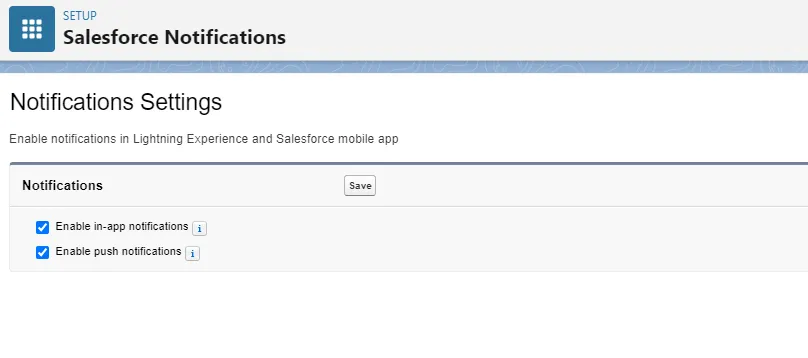
- The Salesforce Setting 'Enable notifications in Lightning Experience and Salesforce mobile app' needs to be set as follows