Authorisations
Authorisations represent saved payment methods that can be used for future transactions. They are essentially records of customer payment information (or supplier bank details for outbound payments) stored securely and used to authorise payments without re-entering details.
Key concepts
- Secure payment storage: Sensitive payment data is never stored directly in Salesforce. Payment service providers tokenize the data, and only secure tokens are stored.
- Flexible processing options: Authorisations can be initiated in two ways:
- Agent-assisted (internal): Your sales or support team collect payment information from customers and enter it into Salesforce using a secure payment page.
- Customer self-service (external): Customers receive a secure link and submit details themselves.
- Automated recurring billing: Once authorised, a payment method can be used to automate subscriptions, instalments, or other recurring charges.
- Inbound and outbound payments: Authorisations can support:
- Inbound payments: collecting money from customers
- Outbound payments: storing supplier bank details for payouts.
How it works
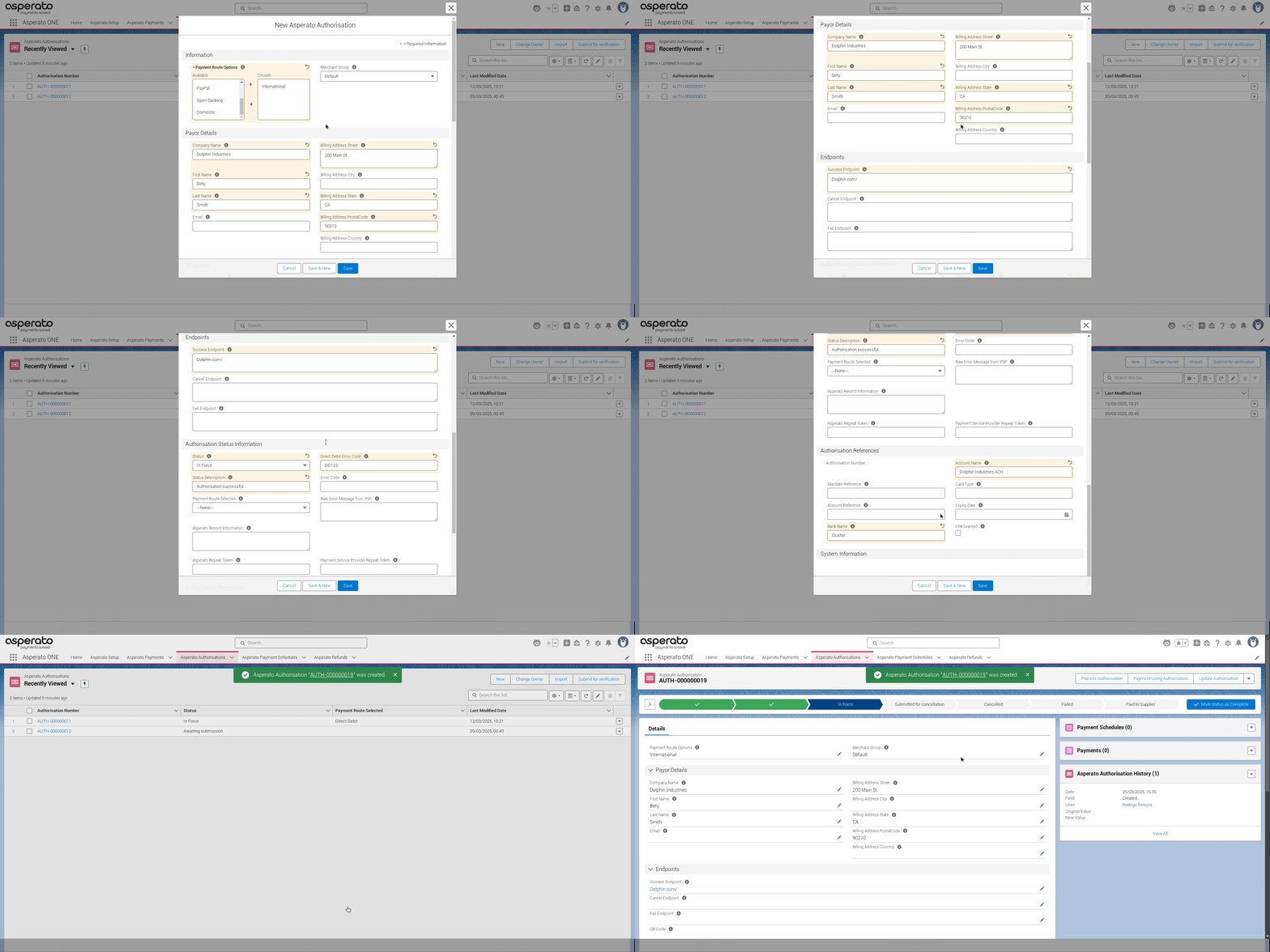
Create an Authorisation record
This record will initially contain information about the customer (or supplier, for outbound authorisations) and the intended payment method (e.g., card, direct debit). At this stage, no payment details are entered. Authorisations can be created for any payment route aside from Paypal.
Collect payment details
Payment information is collected and processed for validation. For outbound payments, bank details may first be verified.
Authorisation becomes active
Once an authorisation is successfully processed (reaching the In Force status), it's ready for use. For inbound, the In Force status is used to receive payments from customers, often automatically and repeatedly. For outbound, it's used to send payments to suppliers, usually as individual transactions.
Payment Confirmation or Failure
The payment gateway returns a confirmation or failure message. This information is updated in the Payment record.
Flow
flowchart TD
classDef startEnd fill:#002D4C,stroke:none,color:#FFF,font-weight:600,font-family:Helvetica,rx:5px,ry:5px;
classDef process fill:#42A4DD,stroke:none,color:#FFF,font-weight:500,font-family:Helvetica,rx:5px,ry:5px;
classDef decision fill:#F4F7FA,stroke:none,color:#002D4C,font-weight:600,font-family:Helvetica,rx:5px,ry:5px;

A[Create Authorisation Record in Salesforce]-->B{Process Authorisation?}
B--Internally (Agent)-->C[Click 'Process Authorisation' Button]
C-->D[Paypage Appears —internal—]
D-->E[Customer/Agent Enters Payment Details]
E-->F[Authorisation Details Updated in Salesforce]
B--Externally (Customer)-->G[Retrieve 'Ecommerce URL']
G-->H[Send URL to Customer]
H-->I[Customer Clicks URL]
I-->J[Paypage Appears —external—]
J-->K[Customer Enters Payment Details]
K-->F
F-->L{Authorisation Successful?}
L--Yes-->M[Authorisation Status: In Force]
L--No-->N[Authorisation Status: Failed]
M-->O[Use Authorisation for Payment]
N-->P[Investigate and Resolve Issue]


class A,M,O,N,P startEnd
class C,E,F,G,H,I,J,K process
class B,L decision
Key fields
Field | Description |
|---|---|
Authorisation URL | This is the link you provide to your customers to enable them to provide authority to save a payment method. |
Status | Tells you if the Authorisation is ready to use or not. Authorisations have to be ‘In Force’ before they can be used to collect payments. |
Status Description | A descriptive text showing the reason related to the current status. Might contain the reason for cancellation or failure for example. |
Payment Route Options (Required) | Allows you to choose which Authorisation routes are available to your customer to use. E.g. Card, Direct Debit or ACH |
Payment Route Selected | Tells you which type of payment method has been granted by the customer |
Statuses
In order for an Authorisation to be used to collect payments, it must be marked as status of In Force. The following statuses are available on the Unaric Payments Authorisation object.
Status | Description |
|---|---|
Awaiting submission | The authorisation has not yet been processed by the PSP. |
Pending | This status is used for direct debits, and indicates the authorisation has been processed but is not yet in force. Direct debit authorisations have a lead time of a few days before they become active—see Timing cycles for details. This status isn’t relevant for card authorisations, as they become active (or fail) instantly. |
In Force | The authorisation has been confirmed, is valid, and can be used to authorise a payment. |
Submitted for Cancellation | This status is used for direct debit payments created using GoCardless connection. It shows that the mandate/authorisation has been submitted for cancellation at the request of the payor, or at your request. The status is automatically updated to Cancelled when the mandate is cancelled at GoCardless |
Cancelled | The authorisation was cancelled at the request of the payor, or at your request. |
Failed | The authorisation is not valid / no longer valid and cannot be used to take payments. |
Expired | The authorisation has expired, and can no longer be used to take payments. |
Custom references
Some PSPs allow you to specify a custom reference attached to an authorisation. You can specify this by using the Custom reference field available on the authorisation object.
However, note that not all PSPs or PSP account types support custom references, and some often have restrictions on the maximum length of a reference. You should check your PSPs documentation for any rules around specifying custom references. Note that setting a custom reference where they are not supported, or setting an invalid custom reference, may cause a transaction to fail.