Paypages
Paypages provide a secure and stylish interface to capture all the sensitive data required to collect money from your customers.
Key features
Security & compliance
Paypages are built to meet payment security and compliance requirements:
- PCI-DSS compliant secure data capture
- Support for 3D Secure authentication when required
- Address validation and card verification checks
- Card identification, BIN checking, and expiry validation.
- Automatically apply the required scheme rules and labelling for direct debit payments. See Bacs guidance for details.
Payment methods
A single paypage can support multiple payment routes, including:
- Card payments
- Direct Debit
- ACH/eCheck payments
- PayPal payments.
Customisation & control
Paypages are controlled directly from Salesforce records, meaning:
- Page behaviour depends on the associated Payment or Authorisation record
- Redirect URLs for success, cancellation, or failure can be configured
- Multi-language and multi-currency support is available.
Integrations
Paypages are designed for seamless integration and robustness:
- Compatible with Salesforce Lightning components and communities
- Suitable for embedding in websites, portals, or documents
- Continuously tested with BrowserStack.
How it works
Paypages are available once an Unaric Payments record (Payment or Authorisation) has been created. The information entered in the Salesforce record determines:
- Payment amount and frequency
- Available payment methods
Customer details and prefilled fields.
These records generate the URL related to the paypage you need to share to your customer for payment.
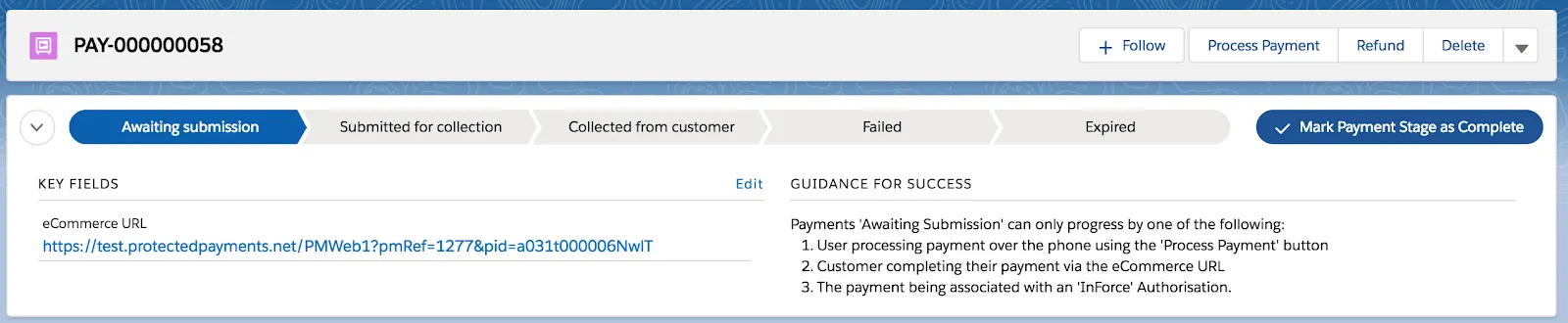
There a many ways to distribute the paypage URL:
- Email or messaging links
- Buttons in invoices or contracts
- Embedded forms in websites or portals.
Paypage template
We have designed our paypages to function as a checkout screen, these should look and feel just like a simple form. They are functional across many devices and as such the layout is fixed. Stylistic changes can be applied.
The paypage template is highly dynamic and responds to the following parameters within Salesforce:
- Amount
- Frequency (including one-off payments)
- Payment types (including combinations of payment types, such as Card & Direct Debit, PayPal & Direct Debit, Card, PayPal & eCheck, etc.)
- Address data (can be pre-populated)
- URL to navigate to on completion of the payment (including cancel, fail, & success endpoint fields)
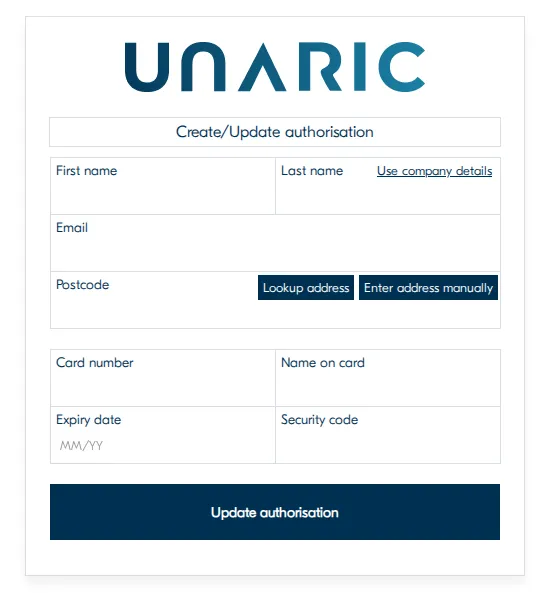
The template also has the following dynamic elements built-in:
- Notification if the Salesforce web service cannot be contacted
- UK postcode checker & lookup
- Display of card type based on card number
- Validation of card number using the Luhn algorithm
- Display of issue number & start date fields only if the card requires it
- Validation of security code as 3 or 4 digits depending on the card type
- Ability to switch between Card, Direct Debit, eCheck, or PayPal on the fly
- Ability to enter IBAN or distinct local bank details for all BACS/SEPA European Direct Debit countries
- Automatic hiding/showing and labelling of local bank detail fields based on selected country
- Compliance with BACS and SEPA scheme rules; correct compliance labelling is determined by scheme rules in the selected country
- Choice of payment type to show by default
Paypage template styling
The paypage can have some stylistic changes applied in order for it to fit within your customer journey, this includes:
- Changing page font
- Changing button colours (text and background in both normal and hover mode, and border)
- Changing link colour
- Changing the logo (ideal size is 400px wide and 80px high, though the height is the key factor. Any bigger and you risk truncation). We can also remove the logo completely if required.
- Changing the page title
- Hide / show "pay as company" link
- Hide / show postcode lookup
- Hide / show billing address
- Switching between IBAN and local details for Direct Debits
- Changing the 'processing' GIF from the default gears
- Changing the favicon (the icon that appears in the browser's tab for the website.)
If you require any customised changes, contact [email protected] as we will have to apply these customisations for you.