Omni-Channel Integration
Unaric Voice supports bidirectional synchronization with Salesforce Omni-Channel presence states. This integration ensures that your availability is consistent across voice and other service channels like chat, social, or case routing.
How it works
When presence sync is enabled:
- A change in Unaric Voice updates the Omni-Channel status.
- A change in Omni-Channel updates the Unaric Voice softphone status.
This allows agents to manage their workload across channels. For example:
- When an agent receives a call via Unaric Voice:
- Omni-Channel presence is set to Busy, preventing new chat or case assignments.
- When an agent is actively working cases via Omni-Channel:
- Unaric Voice sets the presence state to Do Not Disturb (DND).
Flow
graph TD
    A[User Logs into Omni-Channel<br/>Selects Channel: Chat, CTI] --> B{Status Change Location}

    B -->|Unaric Voice Softphone| C[Change Status in Softphone]
    B -->|Omni-Channel Panel| D[Change Status in Omni-Channel]

    C --> E[Omni-Channel Status Updates<br/>Example: Receiving call → Busy]
    D --> F[Unaric Voice Status Updates<br/>Example: Working cases → DND]

    E --> G[Bi-Directional Sync Active]
    F --> G

    G --> H[Examples:<br/>Chat → Chat DND<br/>CTI Online → CTI Busy]

    classDef teal fill:#08496B,color:white,stroke:none,font-family:Arial,font-size:18px
    classDef matisse fill:#1B7EA1,color:white,stroke:none,font-family:Arial,font-size:18px
    classDef diamond fill:white,stroke:#1B7EA1,color:#08496B,shape:diamond,font-family:Arial,font-size:17px
    classDef rectangle fill:white,stroke:#1B7EA1,color:#08496B,font-family:Arial,font-size:18px

    class A teal
    class B diamond
    class C,D,E,F,G rectangle
    class H matisse
Configuration
To enable this feature, complete the setup in Salesforce Setup → Omni-Channel → Presence Configuration.
Refer to your Salesforce admin for access or customization of Omni-Channel presence status mappings.
Login and presence selection
To activate synchronization:
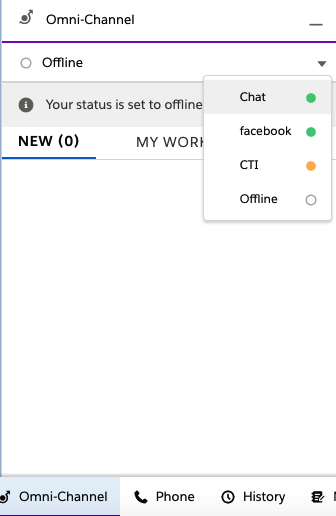
- Log into Omni-Channel by selecting an available channel (e.g., Chat, Facebook, or CTI).
- Set your presence in either:
- Unaric Voice softphone, or
- Omni-Channel utility panel
The selected presence is reflected in both systems.
Behaviors
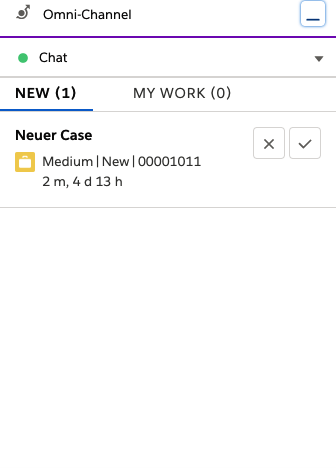
- Selecting Chat in Omni-Channel sets Unaric Voice to Chat (DND).

- Selecting CTI (Online) in Unaric Voice updates Omni-Channel to CTI - Busy.


- If Omni-Channel is offline, Unaric Voice defaults to Online status.