7 May 2026
Summary
Release window: Thursday 7th May 2026, 05:00 UTC
Service impact: None expected; backend changes only.
Customer action: Changes relate to Unaric Voice for Teams production environment only. If you haven't migrated already from our Beta environment to production, contact us at [email protected].
Support
If something isn’t working as expected after this update, contact: [email protected]
Improvements
Adjustable notes
You can now adjust the size of your phone notes section with Unaric Voice for Teams. Drag the notes field to increase or decrease their size.
Known issues
Ring All / Missed calls duplicate tasks created in Salesforce
When calls come into multiple agents via a call queue, missed call tasks will be created for all agents other than the agent that answered the call (if all agents miss the call, a missed call task will be created for all agents).
Temporary fix: As a workaround, missed calls will not be stored in Salesforce via the softphone. Unaric Sync (now available as Beta / Preview) will handle and sync missed calls into Salesforce. Unaric Sync is available via our Voice for Teams Production environment. Please get in touch if you would like to migrate.
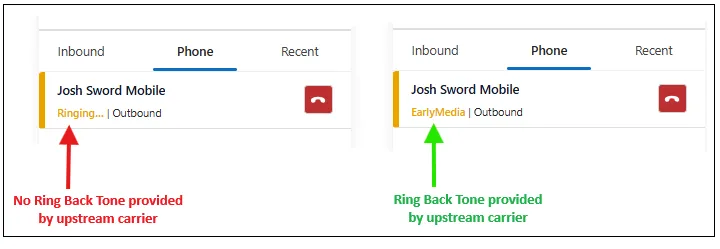
No ring back tone (RBT) heard in Unaric Voice for Teams (outbound calling)
Some instances have reported no ring back tone when making an outbound call. So far, this issue has only been raised by customers using Teams Direct Routing.
Status: Under investigation. This issue is caused by the upstream carrier not providing a ring back tone, so the call is silent until it is either answered, or hits voicemail. When making the call via the Teams Desktop or web client, you will hear the default Teams outbound calling melody played while the call connects (this is Microsoft's way of providing feedback to the caller if no RT is provided by the upstream carrier).
Solution: The Summer release will include a fix to this issue. We will insert our own melody for outbound calls if the ring back tone is not provided by the upstream carrier (in the same way that Microsoft Teams does today).
Temporary fix: An alternative fix is to add a ring back tone to your SBC if using Direct Routing or by raising a request with your Direct Routing provider, asking for them to insert the ring back tone. If you see Ringing in Unaric Voice for Teams, then the ring back tone is not being provided, so the call will be silent until answered or voicemail. If you see EarlyMedia, the Ring back tone is being provided, and you will hear the ringing: