23 March 2026
All changes will be pushed to the backend and will be fully functional on Monday morning; no customer action is required.
Summary
Release window: Monday 23rd March 2026 — 05:00 UTC
Service impact: None expected; backend changes only
Customer action: None required
Support
If something isn’t working as expected after this update, contact: [email protected]
Improvements
Best match number search
Inbound calls to Unaric Voice for Teams now use a best-match number lookup instead of exact match. Numbers stored in local formats will match inbound E.164 PSTN numbers.
Example: An inbound call from +1 222 333 4444 will match any of: +12223334444, 12223334444, 2223334444
Teams UPN tooltip
Hover over the display name to view the signed-in Teams user UPN.
Click-to-Dial (SIP) added to Recent
For customers using Unaric ACI (Availability & Contact Info), outbound calls to federated external SIP addresses now appear in Recent. You can call back via SIP, and the call is linked to the contact name (clickable to open the contact record).
Fixed issues
Login issues via Google Chrome — On Wednesday 18th March some users were unable to log into Unaric Voice for Teams in Google Chrome. Status: Resolved in March 23rd Update
Click-to-dial via SIP address — Phone tasks not linked to contacts (for Unaric ACI customers) A fix is included: phone tasks are now linked to the contact when placing an outbound call using an external federated user's SIP address. Status: Resolved in March 23rd Update
Double “hang up” click may show Idle call state Clicking hang up twice in quick succession could cause the UI to hang and display Idle. Status: Resolved in March 23rd Update
Known issues
Wrap-up values overwritten with multiple ongoing calls In some cases, wrap-up notes on one call could be overwritten by notes on a second call when two calls are live simultaneously.
Status: Under investigation
Immediate hang up causes disconnect If you answer a call and immediately hang up, this may cause Unaric Voice for Teams to hang in a Disconnected state.
Status: Under investigation
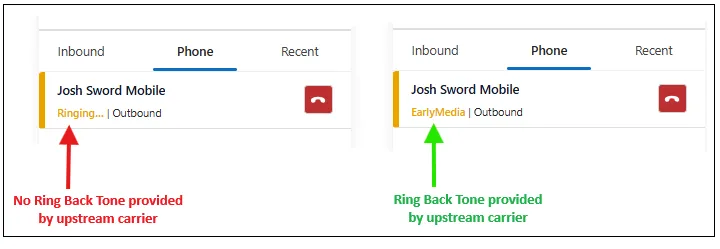
No ring back tone (RBT) heard in Unaric Voice for Teams (outbound calling). Some instances have reported no ring back tone when making an outbound call. So far, this issue has only been raised by customers using Teams Direct Routing.
Status: Under investigation. This issue is caused by the upstream carrier not providing a ring back tone, so the call is silent until it is either answered, or hits voicemail. When making the call via the Teams Desktop or web client, you will hear the default Teams outbound calling melody played while the call connects (this is Microsoft's way of providing feedback to the caller if no RT is provided by the upstream carrier).
Solution: The Summer release will include a fix to this issue. We will insert our own melody for outbound calls if the ring back tone is not provided by the upstream carrier (in the same way that Microsoft Teams does today).
Temporary fix: An alternative fix is to add a ring back tone to your SBC if using Direct Routing or by raising a request with your Direct Routing provider, asking for them to insert the ring back tone. If you see Ringing in Unaric Voice for Teams, then the ring back tone is not being provided, so the call will be silent until answered or voicemail. If you see EarlyMedia, the Ring back tone is being provided, and you will hear the ringing: