Setup & Installation
Setup Error dialogue
If you encounter an error dialogue during Unaric Payments setup, it's likely due to missing or incorrectly configured Remote Site Settings in Salesforce. Unaric Payments requires these settings to communicate with Salesforce.
Troubleshooting
- In Salesforce, Navigate to Setup > Remote Site Settings. This page lists all registered remote sites and their status (Active or Inactive).
- The Remote Site Settings page should list the necessary Unaric Payments remote sites and they should be marked as Active.
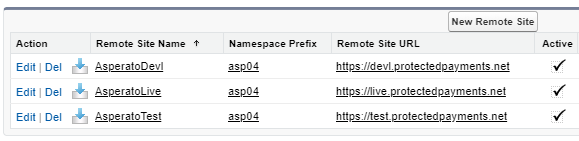
- In case the Active checkbox is unchecked, you'll need to hit the Edit link by each remote site to activate it.
- If the required remote sites are not present or are inactive, you will need to add or activate them. Contact the support team at [email protected] for the correct URLs and configuration instructions.
The Unaric Payments Setup tab is blank
You'll need to enable, and deploy My Domain to your users before you can view the Unaric Payments Setup tab correctly. See My Domain.
PSPs with no connection status available
When creating a new PSP connection on Unaric Payments, users must enter the authentication details provided by their PSP. If the details are correct, a tick will be shown; if incorrect, the connection will fail and, in most cases, a cross will be shown.
However, there are some exceptions to this rule. Some PSP APIs do not give Unaric Payments the functionality to determine if the authentication details are successful. In these cases, we have to assume those details are correct, since we have no way of checking them. Currently we're unable to check the status of the following PSPs:
- Adyen
- Sagepay
Since this is a limitation imposed by the PSP, it is not possible to change it from Unaric Payments.