Include Help in Wrapper Components
Include Improved Help in locally defined ‘wrapper’ components.
- Our Improved Help components can be incorporated into locally defined composite Lightning components (composites).
- Such composites can be used wherever one would normally position components, including, for example, flow screens.
- Once Help components are included within the desired UI, content authoring is a non-technical exercise: Authors can work 'in-place' where the content appears or on dedicated layouts.
There are two approaches for embedding Improved Help components inside your own custom Lightning components:
- Aura Components: You can directly include Help components in your markup using tags like <iahelp:IHDetail> with attributes
- Lightning Web Components (LWC): Since cross-namespace components aren't supported in LWC, you use an IFRAME pointing to the Lightning Out Host page
Aura wrapper components
Our Lightning Aura components can be included directly within locally defined composites.
Improved Help component mark-up
All Improved Help components can be added into your own Lighting component mark-up: simply add the appropriate component tags and set their attributes. A typical tag for a Help component will resemble the following:
<iahelp:[Component API Name]>
<aura:set attribute="[Attribute name]" value="[Desired Value]" />
</iahelp:[Component API Name]>- [Component API Name] is the name of the desired Help component;
- [Attribute name] is the name of the attribute to be controlled;
- [Desired Value] is the value to set for the attribute.
As with the Lightning Out host, component and attribute names are case sensitive and as specified in the relevant component definitions under ‘Design attributes’.
The following code snippet could be used to add a listing of Related Help Resources to a locally-defined Lightning component, with the Topic whose Resources are to be displayed controlled by a locally defined SelectedHelpTopic attribute:
<aura:set attribute="recordId" value="{!v.SelectedHelpTopic}" />
<aura:set attribute="CardConfig" value="Resources" />
</iahelp:IHList>
Controlling component layout
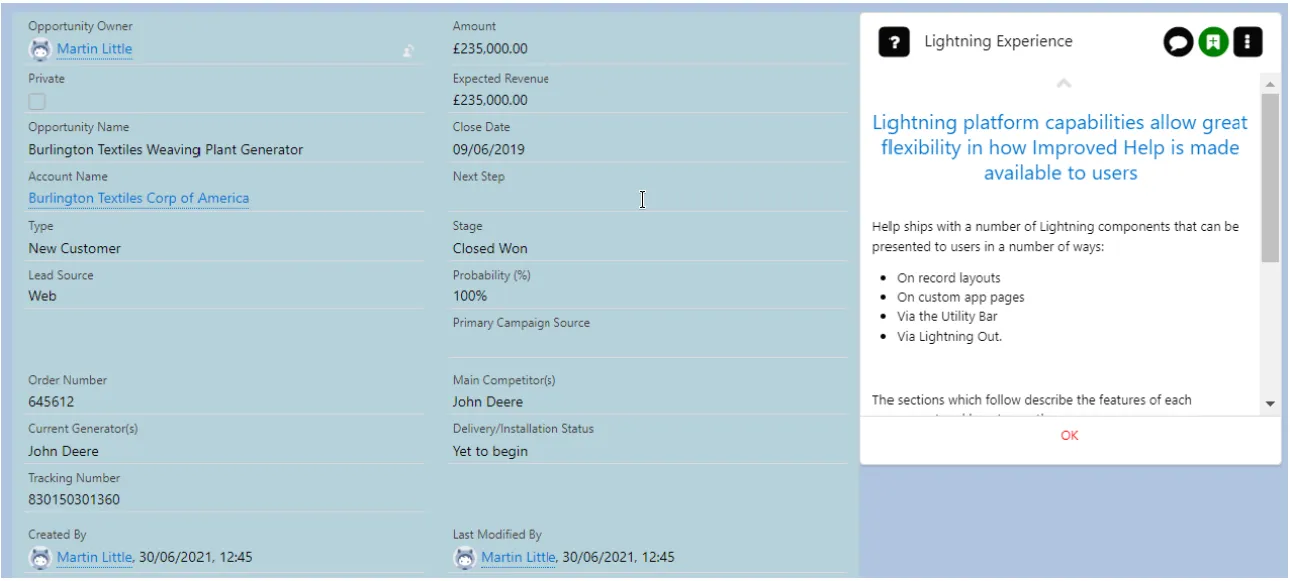
Standard web and Salesforce mark-up authoring techniques can be used as desired to position Help components within broader page layouts. In particular, we advise Customers to make use of the Salesforce Lightning Design System and its responsive grid layout (slds-grid) facilities: please search Salesforce documentation for details. By way of example, the mark-up below positions a Help Topic viewer in the right hand ⅓ of the screen, with the left hand two-thirds used to show a Saleforce record:
<div class="slds-grid" >
<div class="slds-col slds-size_2-of-3" style="background-color: rgb(182, 209, 218);">
<force:recordView>
<aura:set attribute="recordId" value="006A000000E7D0XIAV" />
</force:recordView>
</div>
<div class="slds-col slds-size_1-of-3">
<iahelp:IHDetail>
<aura:set attribute="HelpRecordId" value="a0T2G00000AUietUAD" />
</iahelp:IHDetail>
</div>
</div>
The above mark-up produces a component with a layout similar to the image accompanying this Topic.
LWC wrapper components
Our Lightning Web Components can be included in wrappers using our Lightning Out Host As SFDC do not allow components to be shared across namespaces in LWC, composites rely on our Lightning Out Host page (iahelp__IHLUXOutHost), presented via an IFRAME.
The Composite's code controls which Help components to present via the host as well as how, when and where to display the IFRAME. Please see the materials related to this Topic for an example.
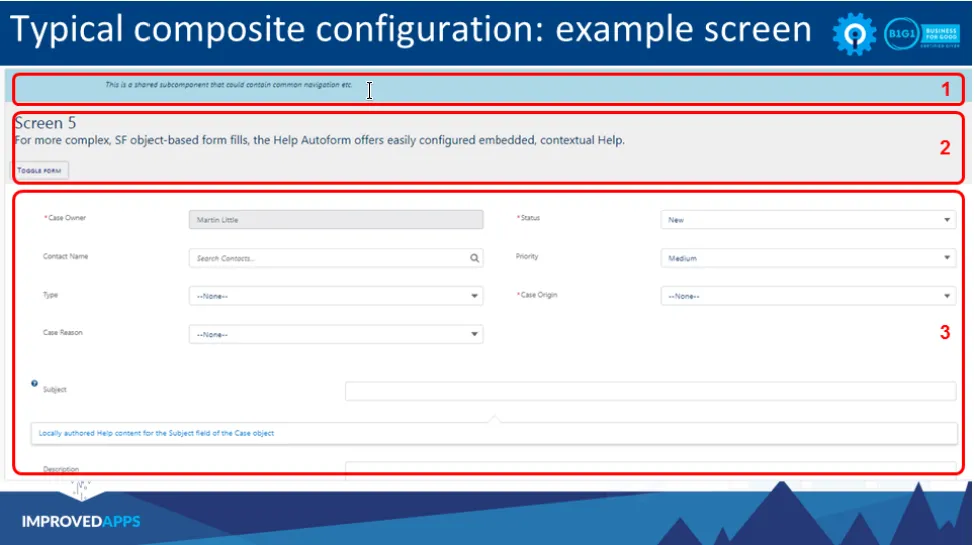
LWC Composite: example screen
LWC Composite: HTML
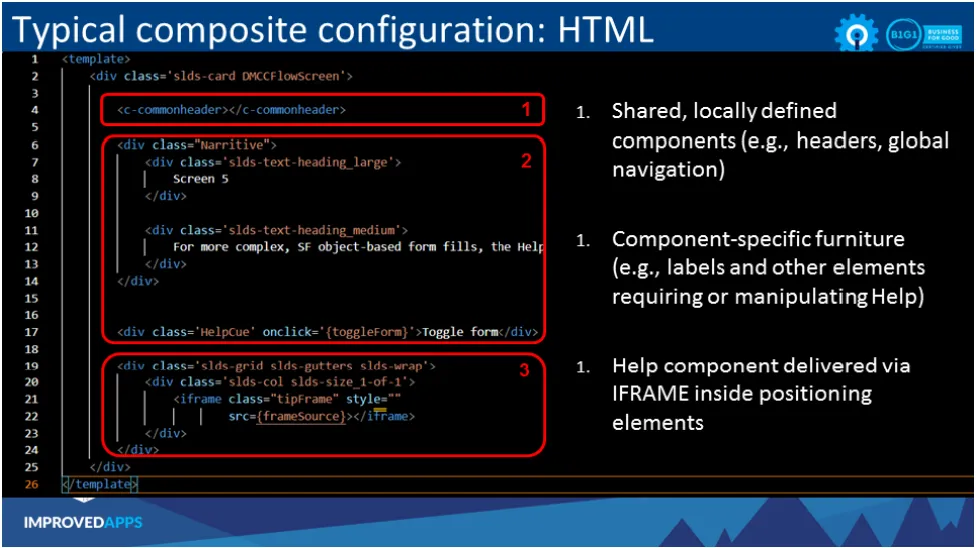
<template>
<div class='slds-card DMCCFlowScreen'>
<c-commonheader></c-commonheader>
<div class="Narritive">
<div class='slds-text-heading_large'>
Screen 5
</div>
<div class='slds-text-heading_medium'>
For more complex, SF object-based form fills, the Help Autoform offers easily configured embedded, contextual Help.
</div>
</div>
<div class='HelpCue' onclick='{toggleForm}'>Toggle form</div>
<div class='slds-grid slds-gutters slds-wrap'>
<div class='slds-col slds-size_1-of-1'>
<iframe class="tipFrame" style=""
src={frameSource}></iframe>
</div>
</div>
</div>
</template>
LWC Composite: Javascript
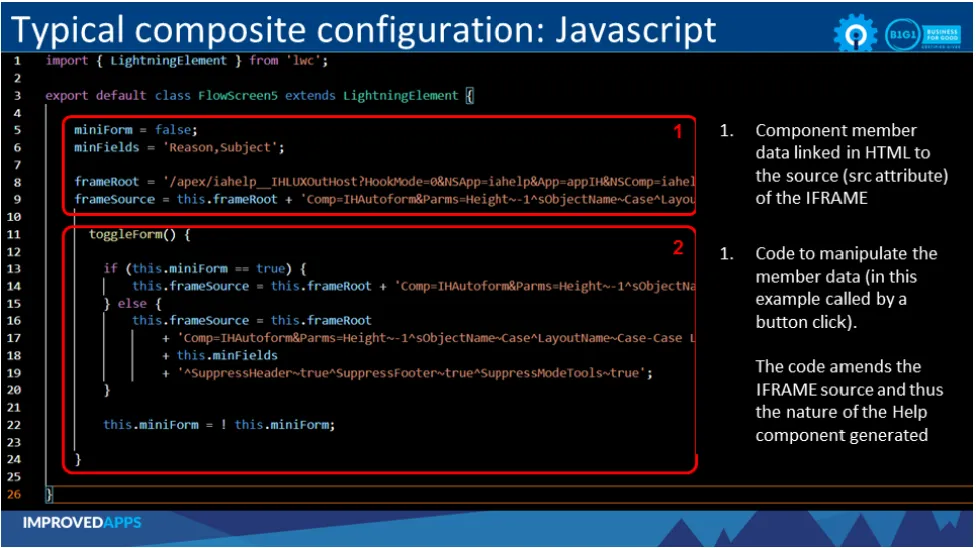
import { LightningElement } from 'lwc';
export default class FlowScreen5 extends LightningElement {
miniForm = false;
minFields = 'Reason,Subject';
frameRoot = '/apex/iahelp__IHLUXOutHost?HookMode=0&NSApp=iahelp&App=appIH&NSComp=iahelp&';
frameSource = this.frameRoot 'Comp=IHAutoform&Parms=Height~-1^sObjectNameCase^LayoutNameCase-Case Layout';
toggleForm() {
if (this.miniForm == true) {
this.frameSource = this.frameRoot 'Comp=IHAutoform&Parms=Height~-1^sObjectNameCase^LayoutNameCase-Case Layout';
} else {
this.frameSource = this.frameRoot 'Comp=IHAutoform&Parms=Height~-1^sObjectNameCase^LayoutNameCase-Case Layout^LimitFields~' this.minFields '^SuppressHeadertrue^SuppressFootertrue^SuppressModeTools~true';
}
this.miniForm = ! this.miniForm;
}
}