Create Records During Call
Unaric Voice allows you to create records directly from the softphone interface while on a call. This can be practical for many purposes:
- To create a new Lead, Account, or Contact if the caller’s phone number isn’t recognized in Salesforce
- To create a new Opportunity during a sales call
- To log a Case for customer support
- To launch a Flow or Visualforce page
Field population
- When creating a Lead, Account, or Contact, the caller’s phone number is inserted automatically.
- For standard objects like Cases, Unaric Voice also inserts the related contact (if identified).
- If you're creating a custom object with a lookup relationship to an Account or Contact, the related record is autofilled.
Create records during call
- During an active call, use the Create New… picklist in the Unaric Voice softphone.
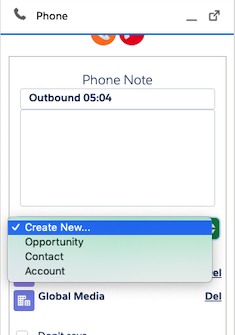
- Select the object you want to create (e.g., Lead, Case, Opportunity). A new browser tab or window opens with the record creation page.
- Once saved, the newly created record is automatically assigned to the call.