Call Result (Wrap-Up)
After a call ends, Unaric Voice allows you to log a Call Result, also known as a Wrap-Up. The Call Result serves two key purposes:
- It is saved in a dedicated field within the call activity.
- It appears in the Subject line of the call record (this is configurable).
This feature is commonly used to track outcomes such as Got Voicemail or Meeting Scheduled. In this way, you can categorize the outcome of the interaction and consequently track call performance across teams.
Flow
graph TD
    A[Call Ends] --> D{Call Direction?}
    D -->|Outbound| E[Outbound Picklist<br/>Got Voicemail, Meeting, No Answer]
    D -->|Inbound| F[Inbound Picklist<br/>Callback, Transfer, Resolved]

    E --> G[User Selects Call Result]
    F --> G

    G --> H[Call Result Saved]
    H --> I[Dedicated Field<br/>in Call Activity]
    H --> J[Subject Line<br/>of Call Record]

    I --> K[Sales Engagement<br/>Cadence Influenced]
    J --> K

    classDef teal fill:#08496B,color:white,stroke:none,font-family:Arial,font-size:18px
    classDef matisse fill:#1B7EA1,color:white,stroke:none,font-family:Arial,font-size:18px
    classDef diamond fill:white,stroke:#1B7EA1,color:#08496B,shape:diamond,font-family:Arial,font-size:17px
    classDef rectangle fill:white,stroke:#1B7EA1,color:#08496B,font-family:Arial,font-size:18px

    class A teal
    class D diamond
    class E,F,G,H,I,J rectangle
    class K matisse
Wrap-up picklists
Unaric Voice supports separate picklists for inbound and outbound calls to ensure relevant options are presented depending on the call direction:
Call type | Result examples |
|---|---|
Outbound | Got Voicemail, Out of Office, Meeting, No Answer |
Inbound | Requested Callback, Transferred to Support, Resolved |
Call result UI
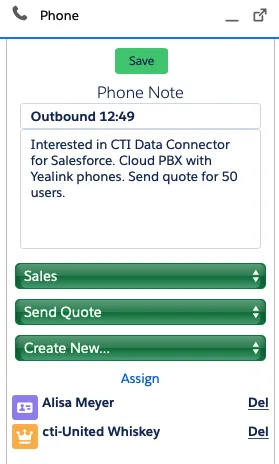
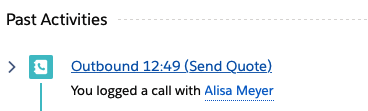
After the call is terminated, you can benchmark the call by selecting a call result. It is saved in an own field in the activity of the call and is also visible in the subject line of the phone call.
Call wrap-up time
Once a call ends, a Wrap-Up timer begins. This gives the user time to log the Call Result and complete any post-call notes or actions.
How it works
- The wrap-up time duration is defined in the Call Center Setup.
- The user can extend the timer:
- Hover over the 🕒 icon to see how much time is left.
- Click the icon to extend the wrap-up period for the current call.
- If the user manually changes their presence status (e.g., to DND), the wrap-up timer is skipped, and the selected status takes effect immediately.
- Wrap-Up Time does not apply to outbound calls that were not answered (unsuccessful calls).
Configuration options
Admins can tailor how Wrap-Up works to meet specific requirements:
- Wrap-Up groups can be created to provide different result lists for different use cases (e.g., sales vs. service, or product-specific outcomes).
- The Call Result field can be:
- Mandatory
- Optional
- Disabled
- A default value can be set for the picklist.
You must enable both Call Wrap-Up and Create Record During Call features in the softphone layout for this functionality to work.