Compose Using ChatGPT
Prompt ChatGPT to generate a professional starting point for your emails.
- In your inbox, open the ChatGPT Connector.
- Click the Compose Using ChatGPT button.
- Provide instructions for writing the email and click Continue. For better results, be specific in your request: Write an email asking Ann about the release notes due today rather than ask for the latest release notes.
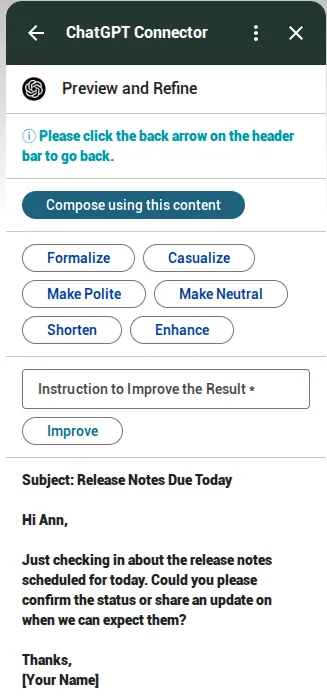
- The connector will create a draft with the output to your prompt.
Refine and adjust
While screenshots utilize the Gmail interface for demonstration, these instructions apply to both the Gmail and Outlook versions of the ChatGPT Connector.
To ensure the perfect tone before finalizing your draft, toggle on Preview and Refine. This allows you to:
- Select voice alternatives: Adapt the message to the most fitting tone. You can choose between Formal, Neutral, or Casual among other tones.
- Iterate: Provide additional prompts to make precise adjustments or add specific details to the existing text.