---
title: Call Center - Call Wrap-Up / Call Results
slug: voice-german/call-center-call-wrap-up-call-results
docTags:
createdAt: 2024-03-19T14:53:13.534Z
---
To rate a phone call, you can activate the Call Wrap-Up feature, which is displayed at the end of the phone call in the CTI Data Connector SoftPhone.
::Image[]{src="https://helpserver.biz/onlinehelp/cdc/sf/5.0/help2000/images/call-wrap-up.png" size="50" width="279" height="464" position="center" showCaption="false"}
The selected item is saved with the note as an activity in the field **Call Result**.
Find out more about the call result feature in [Call Result (Call Wrap-Up)](docId\:zPJTQYphH7raJg7ExLZFe)
## Configuration
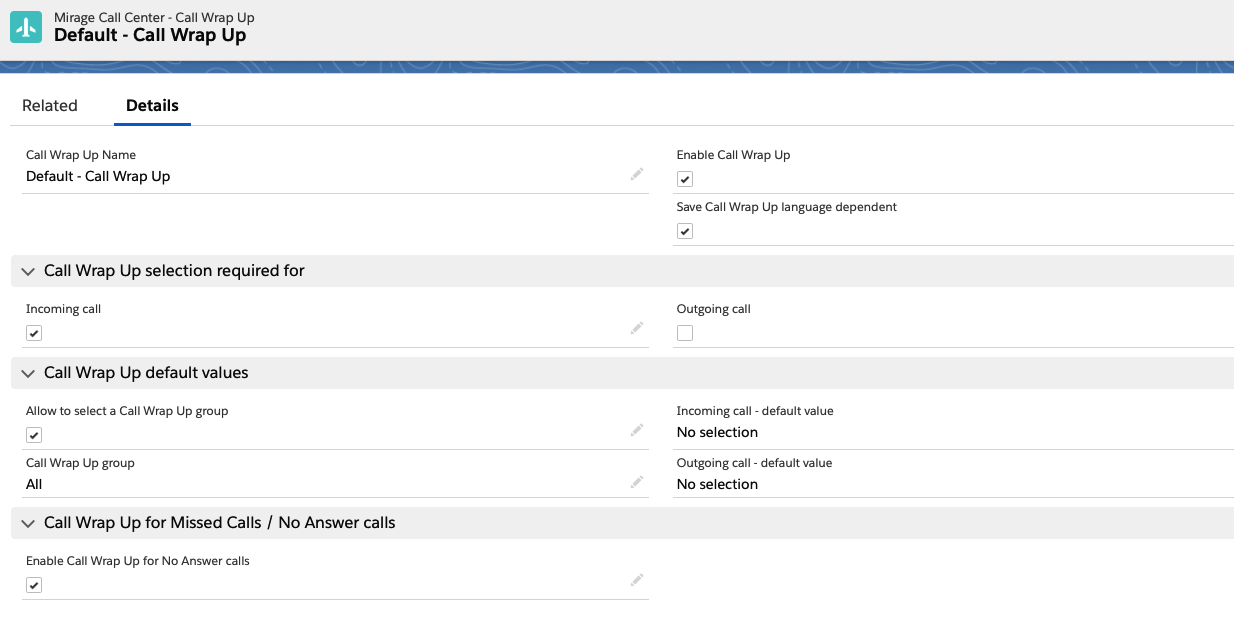
## General Configuration
*Enable Call Wrap-Up*
If enabled, the call Wrap-Up selection is available in the CTI Data Connector SoftPhone.
*Save Call Wrap-Up language dependent*
If this option is enabled, it will save the Call Wrap-Up selection precisely in the language of the user (provided the value is translated). This option should be used if the Salesforce organization only works with one language setup. If you have an international setup, it may be required to do reports about all the countries in one language. If unticked, the Call Wrap-Up API name is used (English by default).
For more information see: [Translating and adding picklist values](docId\:awa15LnUvcceogwdyEk4O).
**Call Wrap-Up Selection required for**
The user has to select a call wrap code. It can be configured for incoming and outgoing calls individually.
If the call Wrap-Up is missing and the user clicks on the button: *Save*, he gets a message to select a call Wrap-Up.
Note
The phone call would still be saved to ensure that all other details of the call are not lost.
## Call Wrap-Up default values
*Incoming call - default value*
You can define a default value for the call Wrap-Up for incoming calls. The user can select any other option. If no other option is selected, the default value is saved.
The default value: ***No selection*** is required if the option is enabled, that a call Wrap-Up is required.
*Outgoing call - default value*
You can define a default value for the call Wrap-Up for outgoing calls. The user can select any other option. If no other option is selected, the default value is saved.
The default value: ***No selection*** is required if the option is enabled, that a call Wrap-Up is required.
### Call Wrap-Up groups
Call Wrap-Up **groups** can be used to have, e.g., different call Wrap-Up lists for *sales* and *service* or having product dependent lists
*Allow to select a Call Wrap-Up group*
If enabled, the user can select after each phone call a group and the call Wrap-Up picklist will only show the values of the group.
| **Call Wrap-Up group enabled**
| **Call Wrap-Up group disabled. The user only sees the values of his group**
|
| ------------------------------------------ | --------------------------------------------------------------------------------------- |
::Image[]{src="https://helpserver.biz/onlinehelp/cdc/sf/5.0/help2000/images/call-wrap-up.png" size="40" width="279" height="464" position="center" showCaption="false"}
::Image[]{src="https://helpserver.biz/onlinehelp/cdc/sf/5.0/help2000/images/call-wrap-upgroup-disabled.png" size="48" width="284" height="470" position="center" showCaption="false"}
*Call Wrap-Up group*
This will be the default call Wrap-Up group if call Wrap-Up group selection is enabled. If disabled, the user will get the picklist values assigned to the specified group.
Example
If call Wrap-Up group is *Sales* and the call Wrap-Up group selection is disabled, then the user only gets the values, specified for sales.
## Call Wrap-Up for Missed Calls / No Answer calls
### *Enable Call Wrap-Up for No Answer calls*
By default, a **call result cannot be selected** for *unsuccessful ****outgoing**** calls.*
However, if the user should be able to select a call result or type in a note, check: *Enable Call Wrap-Up for No Answer calls*. As default value in the picklist, the text configured in:* No Answer Custom Text* - will be used.
There are 2 particular call results.
•If you enable *Automatically create an activity for unsuccessful incoming calls, *an activity is created with the *subject line*: **Missed Call** and the *call result*: Missed Call. You can change these values using *Missed call - custom text *(text is shown in the CTI Data Connector SoftPhone) and *Missed call - text saved in activity*
•If you enable *Automatically create an activity for unsuccessful outgoing calls, *an activity is created with the *subject line*: **No Answer** and the *call result*: No Answer. You can change these values using *No Answer - custom text *(text is shown in the CTI Data Connector SoftPhone) and *No Answer - text saved in activity*
In the example above the call Wrap-Up ***No Answer / Busy ***will be suggested for a non-successful outgoing call but you can select another call Wrap-Up option or type in a note.
:::hint{type="info"}
•The Call Wrap-Up picklist can be modified and translated in different languages
•If you want to update fields depending on a phone call, create a workflow within Salesforce and use the 3 call specific fields (*Call Type, Call Result, Call Duration*) described in [Customize Page Layout for tasks](docId\:nP8MWF5yYjtXixt8RYfgF) to trigger the workflow.
•See also: [Reports and Dashboards](docId\:Ie1p-tAVuzeCu7nXR7vQw)
:::
If you want to have **different options depending on user groups** (e.g. sales and support or you have locations in different countries) you can install multiple Call Center Adapters.
## Activity History - Salesforce Classic only
A good idea is to add the call Wrap-Up code in the activity history view. One glimpse and you are informed about the result of the last call.
